Turn your signed contract into a closing timeline.
Upload your purchase agreement, counters, and addenda. Bindalo pulls out deal details and deadlines for you to review, then brings your timeline, documents, and upcoming tasks together.
2 active deals free. No credit card required.

- Review the details before relying on them.
- Open a suggested deadline to see the contract wording it came from, if one was found.
- Your documents aren't used to train our AI provider's models. Privacy policy
See a contract become a deal you can manage.
Follow a sample purchase agreement from upload to reviewed timeline, then see what needs attention across active deals.
Shown with a fictional sample purchase agreement. Reading time is shortened. The video is about 50 seconds and has no narration.
2 active deals free. No credit card required.
Less setup. A clearer view of every deal.
Stop copying details from PDFs.
Bindalo reads the documents you upload and suggests the parties, price, terms, and deadlines for you to check.
Check where a deadline came from.
Review the contract language behind a suggested date and edit the details before you rely on them.
Know what needs attention today.
See overdue items, upcoming deadlines, and outstanding documents across your active deals.
Check the contract. Confirm the timeline.
AI can misread a clause or miss a change. Bindalo helps you review its suggestions against your documents, and you can edit the details and dates.
See the language behind a date.
Open a suggested deadline to check the contract wording it came from.
Keep dependent dates connected.
When you change a key date, deadlines linked to that date recalculate. Review the updated timeline against the signed agreement and any amendments.
Check holidays and special timing rules.
Bindalo skips weekends for deadlines set to business days. Holidays aren't included automatically, so review and adjust affected dates. Check any contract-specific timing rules before relying on the timeline.
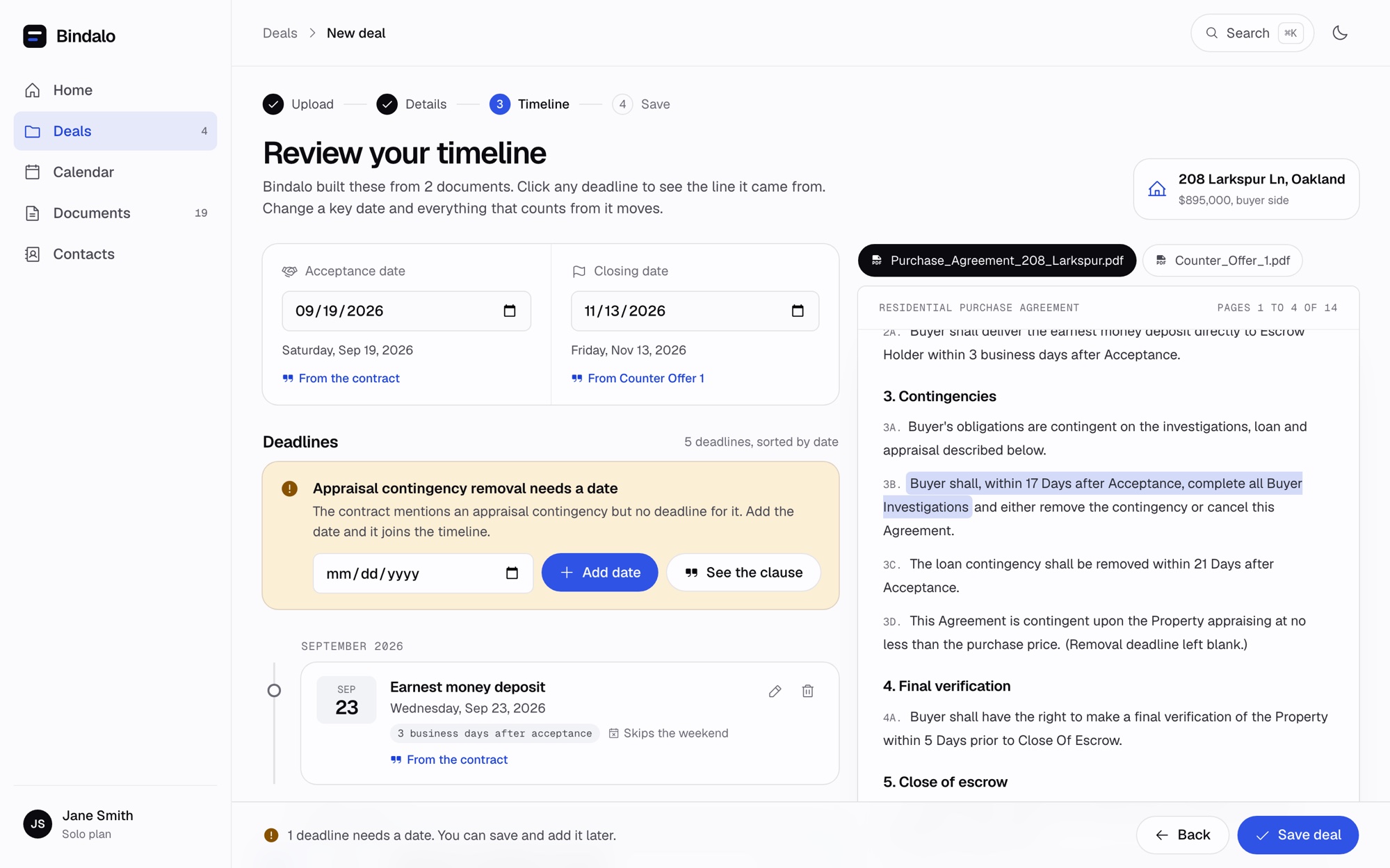
Sample deal with fictional details.
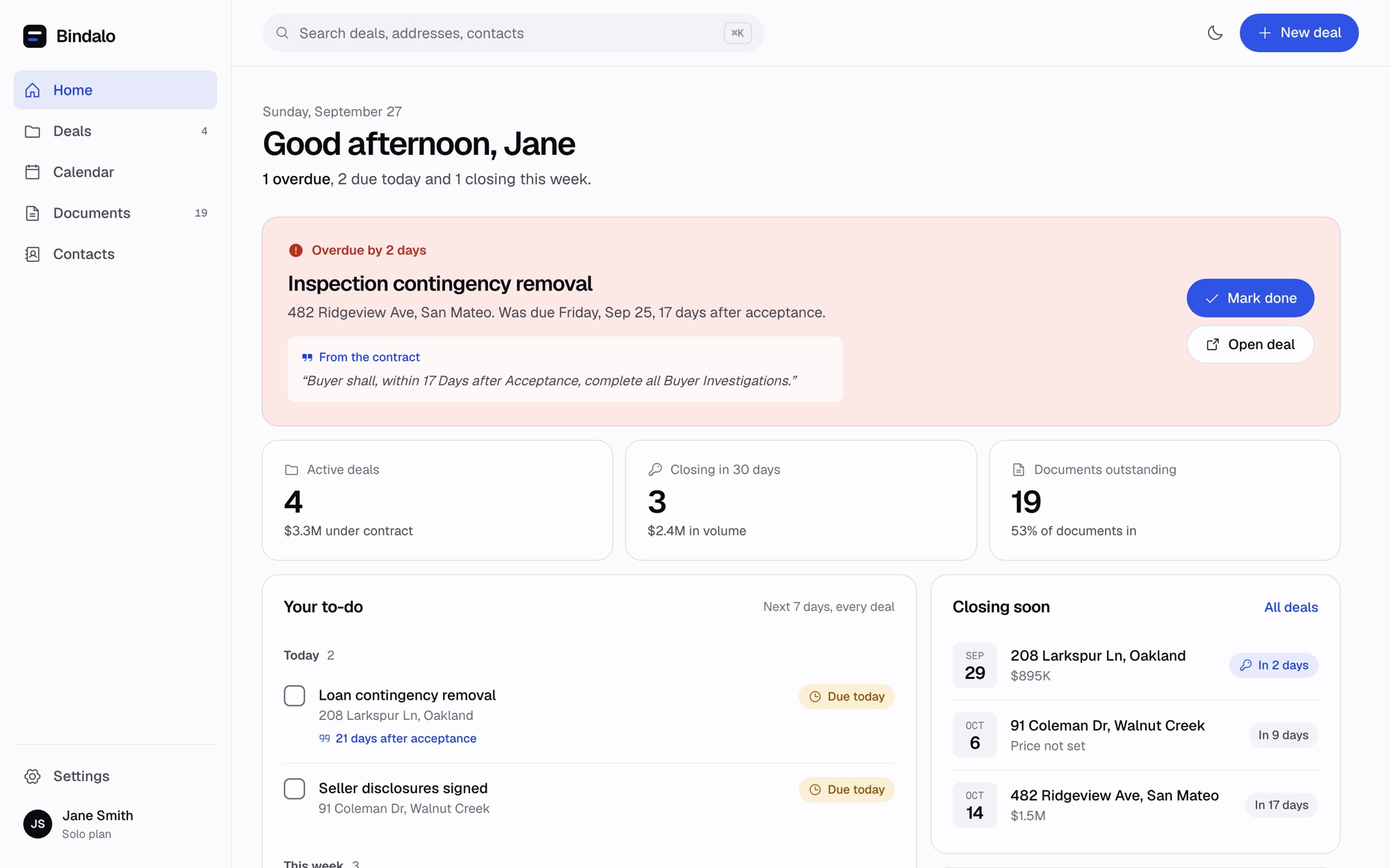
Sample deals with fictional details.
Start your day knowing what needs attention.
See what's overdue, what's due today, and what's coming next across your active deals. Keep the timeline, documents, and contacts with the deal.
Get a deadline overview in your inbox.
Choose a daily or weekly email summary of your deadlines. Change your preference or turn it off in Settings.
Keep the rest of the deal together.
Track outstanding documents.
Mark documents received, waived, or still needed, with a checklist for the side you represent.
See your deadlines on a calendar.
View upcoming deadlines and closings across active deals.
Work from your phone.
Upload a PDF or clear contract photo and review your deals in your phone's browser. Nothing to install.
Find the right deal or contact.
Search by property address, client, or contact to get back to the deal.
Watch a phone upload (short clip)
Simple pricing. No per-deal fees.
Start with 2 active deals free. Solo includes unlimited active deals and up to 60 contract reads a month.
Try Bindalo on your own workflow. No credit card required.
- 2 active deals
- Contract reading
- Timeline, document checklist, and calendar
Founding price. Keep this rate while your subscription remains active.
- Unlimited active deals
- Up to 60 contract reads a month
- Everything in Free
- Cancel anytime
Know how your contracts are handled.
Contracts contain client details. Read how Bindalo stores and processes your documents, and what you can download or delete.
- Connections use HTTPS.
- Stored data is encrypted at rest by the storage provider.
- Documents are processed by the disclosed AI provider under the applicable commercial terms.
- Files can be downloaded from their deals.
Questions before your first deal?
What does Bindalo do?
Bindalo helps real estate agents and transaction coordinators organize deal details, deadlines, and documents. Upload your contract documents, review the suggested details and dates, and track the work across your active deals.
Which documents can I upload?
Bindalo accepts purchase agreements, listing agreements, counters, and addenda as PDFs or clear JPG, PNG, and WebP images. You can add up to 10 files, 8 MB in total, per upload. Upload related documents together so they are read together.
Can Bindalo make a mistake?
Yes. AI can misread dates, miss clauses, or misunderstand changes. Check the suggested information against the signed documents before relying on it. You can edit the deal details and deadlines.
Does Bindalo handle holidays?
Holidays aren't included automatically. Bindalo skips weekends for deadlines set to business days, but you need to check holidays and any special timing rules in your contract and adjust affected dates.
Does Bindalo keep my transaction legally compliant?
Bindalo helps organize information from the documents you upload. It doesn't verify legal compliance or replace your broker's or attorney's guidance. Your signed documents and applicable rules determine the requirements for your transaction.
What happens if a date changes?
When you edit a key date, deadlines linked to that date recalculate. Review the revised timeline against the signed contract and amendments before relying on it.
Can I use Bindalo with my current transaction system?
Bindalo can help organize the contract details and deadlines you review. Keep using the systems your brokerage requires for signatures, compliance, and official records.
Are my documents used to train AI models?
Bindalo's AI provider doesn't train its models on your documents under the applicable commercial terms. See our privacy policy for how documents are processed and stored.
Can I use it on my phone?
Yes. Bindalo works in your phone's browser, including uploading documents and reviewing your deals.
What is an active deal?
Any deal that isn't closed or cancelled. Mark a deal closed and it stops counting, and it stays in your history.
What counts as a contract read?
Each time Bindalo reads an upload (a contract plus any counters and addenda together) to set up a deal. Solo includes up to 60 a month.
What happens at my limit?
Free includes 2 active deals at a time. If you're at the limit, you can upgrade to Solo or close a finished deal to make room. Existing deals are never deleted.
What happens when I cancel?
You can cancel anytime from Settings. You keep Solo until the end of the period you paid for, then move to Free. Your deals and files stay.
Do I receive deadline emails?
You can choose a daily or weekly email summary of what's overdue, due today, and coming up. Change the setting or turn it off in Settings. These are summaries, not instant alerts.
Anything else? Write to phil@bindalo.com.
Put your next deal in order.
Upload your contract, review the details, and see what needs attention next.
Start free2 active deals free. No credit card required.